"There are rolling hills and ivy-covered brick buildings. There are small classrooms, high-tech labs, and well-manicured fields. There’s even a clock tower with a massive bell that rings for special events.
Cushing Academy has all the hallmarks of a New England prep school, with one exception.
This year, after having amassed a collection of more than 20,000 books, officials at the pristine campus about 90 minutes west of Boston have decided the 144-year-old school no longer needs a traditional library. The academy’s administrators have decided to discard all their books and have given away half of what stocked their sprawling stacks -- the classics, novels, poetry, biographies, tomes on every subject from the humanities to the sciences. The future, they believe, is digital."
Read the entire article Welcome to the library. Say goodbye to the books.
[via boston.com]
September 4, 2009


Libraries, With or Without Books
Libraries are no longer just quiet places to read and borrow books. In a world where information is more online and digitized, librarians are changing to meet the needs of their patrons. They are called on to give technical support as well as deal with reference questions and assist patrons with online catalogs and social networking.
Physical books and electronic books are here to stay, but the role of the library will continue to change and develop. Read more about it at CNN.com/technology.
"Think of the changes as a Library 2.0 revolution--a mirror of what's happened on the Web."
Physical books and electronic books are here to stay, but the role of the library will continue to change and develop. Read more about it at CNN.com/technology.
"Think of the changes as a Library 2.0 revolution--a mirror of what's happened on the Web."
September 1, 2009
Key Milestones in the Development of the Internet
Many of us may think that the concept of the Internet is relatively new, but actually its beginnings go as far back as 1969. Check out some fun and interesting facts about the origins and growth of the Internet in Key Milestones in the Development of the Internet. Some facts you may have already known, but some may surprise you.
August 30, 2009
Grooveshark: Easy To Use Music Search Engine

Frequently, I find myself trying to hunt down a particular song that I'm in the mood to listen to, only to find that I do not own the song. So my next step is to do a Google search, go through tons of results, and find the one song to which I want to listen. Thanks to Grooveshark, I won't have to do this anymore.
Grooveshark is a new website that makes finding and listening to songs simple and straightforward. Looking for "The Wonder of You" by Elvis? Go ahead and enter the title into the search box on Grooveshark's homepage, and you will quickly be presented with a list of all the results of your search.
The best part is that instead of giving you a straight list like you would get with Google, you are able to instead organize the list by artist, title, album, and genre. After you select the song you want to hear, you can instantly listen to the song through the iTunes-like, easy-to-use interface.

On top of just listening to songs, you are also able to create an account which allows you to create playlists, and to mark a track as a Favorite. Grooveshark will remember all your Favorites, and create a playlist, for you to listen to at your leisure.
I encourage all music fans to checkout Grooveshark. I have already found it to be an indispensable tool.
August 29, 2009
Setting a Password to Open an Excel Workbook
One of the students in my Intermediate Excel class this week asked me how to set an Excel workbook so a password is required to open or modify it. This is fairly easy.
When you have finished creating your Excel workbook, click on the Office Button in the upper left hand corner, then click on Save As. On the Save As dialog box, click on the Tools button on the bottom left side of the screen. Then click on General Options.
When you have finished creating your Excel workbook, click on the Office Button in the upper left hand corner, then click on Save As. On the Save As dialog box, click on the Tools button on the bottom left side of the screen. Then click on General Options.
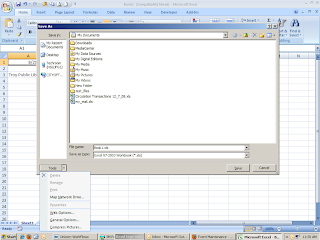 On the General Options box, you can set a password to open or modify the workbook. It is critical that you remember your password. If you forget your password, Microsoft cannot retrieve it. You can also set a recommendation that the file be opened as Read Only.

Top 10 Web Sites for Students
It is back to school time, and the Internet can be a great place to help your children succeed with their research projects and homework assignments. But, learning where to go and how to appropriately use information on the Internet can be challenging to both parents and students.
Marc Saltzman, a freelance journalist, author, and radio and TV host, has a great article, giving a list of the most comprehensive and reliable educational websites a student can use.
Marc Saltzman, a freelance journalist, author, and radio and TV host, has a great article, giving a list of the most comprehensive and reliable educational websites a student can use.
August 28, 2009
Woofer vs. Twitter
Recently Twitter, the popular microblogging site, has amassed a great deal of hype. After being promoted by celebrities and featured on numerous talk shows, including the Oprah Winfrey Show, Twitter has become a household name.
But in spite of the publicity, there are still many people who dislike Twitter both for its limitations and the connotation that all Twitter posts are as inane as what I had for breakfast this morning.
If you are a Twitter Doubter, or just prone to long-windedness, you might enjoy Woofer -- the macroblogging site that requires users to post a minimum of 1,400 characters.
So far nearly eight thousand people have joined Woofer and have made over nine thousand woofs. However, the woof content is not what you might expect of bloggers. Some of the more popular woofs are copied from works such as The Gettysburg Address, A Tale of Two Cities, and Moby Dick. Unfortunately from what I've seen so far the average woof is random words and characters akin to the dreaded spam email.
Clearly, Woofer is not a tool that will replace or even rival Twitter, but it should make for some interesting reading. And even I, a strong microblogging advocate, can enjoy this homage to Twitter.
You can follow The Tech Desk on Twitter @tpltechnology and follow the Troy Public Library @troylib.
And there you have it: 1,400 characters (punctuation and spaces included, of course).
Apple Releases Snow Leopard, Newest Operating System
Apple has just released its newest operating system, Mac OS X Snow Leopard (10.6).
According to this video review at freep.com, Snow Leopard is a “Web browsing speed demon…Hitting the streets with very little fanfare, [the] operating system is a refined, slimmer version of an already great computing system.”
And here is an equally positive review from The New York Times.
Snow Leopard is a $30 upgrade for Mac users running Leopard (10.5).
Microsoft’s newest operating system, Windows 7, is due out in October.
Subscribe to:
Posts (Atom)