Showing posts with label Firefox. Show all posts

July 19, 2010

The Future of Web Browsers: Why You Should Be Excited Pt. 3

The future of web browsers is a great one, due to the introduction of HTML 5, hardware acceleration, and quickly changing user interfaces in the browser market.

If you do not know what a user interface is, Wikipedia provides a great description:
The user interface is (a place) where interaction between humans and machines occurs. The goal of interaction between a human and a machine at the user interface is effective operation and control of the machine, and feedback from the machine which aids the operator in making operational decisions.
In short, the user interface (also referred to as UI) is what you see when you are using a program. More and more web browsers are improving their UI's to make browsing the web easier on users. They are doing this by cleaning up the UI and making it easier to use and to look at.

Let's take a look at some examples to see the the common UI direction that web-browers are going. First, here are examples of Internet Explorer's UI.

Now, here is a look at the UI's of several recently updated alternative browsers:

The key thing to notice is that browsers are continuing to get more and more minimal. The different design teams have clearly worked hard to make some necessary changes to the browser landscape including:

- Eliminating or hiding unnecessary UI elements to make the browser easier to use.
- Pare down the number of drop-down menus
- Increase focus on the Address bar, back button, and search

Firefox's development team went so far as to create a heat map of the most frequently accessed tools in their browser. I found it to be incredibly interesting to see what tools people used the most. As you can see, this heat map shows where most of the focus in the new UI's of the browsers are coming from. These types of studies influence changes made to the browsers UI, which will benefit the average user.

The future continues to rely more and more on the web, and knowing that designer and developers are making it easier to use is a comforting thought.

Be sure to check out my post next week in this four part series on "The Future of Web Browsers: Why You Should be Excited." Next week I will talk about the interesting push toward web applications.

June 29, 2010

The Future of Web Browsers: Why You Should Be Excited Pt. 1

Believe it or not, web browsers have really not come all that far.

Yes, Internet Explorer, Firefox and Chrome have upped the ante when it comes to speed, usability, and safety, but the basics behind how a web page is rendered is still the same as it was in 1997, when HTML 4.0 was introduced.

The good news is that, beginning with the introduction of HTML 5, web browsers are beginning to make some serious changes that will benefit all users in the future. Many browsers have added HTML 5 support already including Firefox, Opera, Safari, and Chrome. Microsoft is planning HTML 5 support for Internet Explorer 9.

Let us look at why HTML 5 is going to help you:
  • Better looking webpages, that are faster and leaner
  • Advanced browser functionality such as "Drag and Drop" and embedded video that doesn't require a plugin, such as Flash.
  • Offline storage
You can see that some of these features are already in use on sites such as Gmail, which allows you to "drag and drop" images into your email. Youtube is also adopting HTML 5 and allows some videos to be viewed without the required Adobe Flash plugin. Instead, you are able to watch the video using the HTML 5 player.

If you are running an HTML 5 compatible browser, you can join the beta testing group here for the HTML 5 Youtube video viewer. You can then check out this video of the world celebrating Landon Donovan's game-winning goal.


HTML 5 is just the beginning of why you should be excited about the future of web browsers. Be sure to check out Part 2 next week when I talk about my favorite upcoming feature: Hardware Acceleration.

May 9, 2010

DoGooder Extension/Addon Aims to Raise Money for Green Initatives

The other day, I was surfing one of my favorite blogs, Downloadsquad, and came across a great article by Lee Mathews about the DoGooder extension for Chrome/Firefox. The extension replaces advertisements on websites with those of "green initiatives and movements for positive social change."

My favorite feature of the extension is that it blocks ugly, frustrating, and just plain annoying advertisements with interesting, colorful, and surprisingly informative ads. Also, I do not have to feel guilty for blocking the advertisements on the site because, as Lee Mathews explains:
Unlike extensions such as AdBlock, DoGooder doesn't actually block a publisher's original ads. Instead, it loads them and then covers them up with its own ads. That's a good thing for publishers, since it means their ad impressions won't be affected. DoGooder also maintains a whitelist of websites which have similar advertising practices, and the extension allows users to flip back to the original ads if they wish to do so.
The only thing I wish I could change with DoGooder is the added icon to the Chrome interface. I hope this will be optional in the future. For additional details about the DoGood program, check out the DoGood Headquarters website.

The DoGooder Extension is available for Chrome and Firefox. I highly recommended it!

November 9, 2009

Happy Birthday Firefox!

Where were you on November 9, 2004? If you were surfing the Internet, you most likely were using Microsoft Internet Explorer 6. On that day, Mozilla released its new web browser, called Firefox.

In the past five years Firefox has introduced many people to the concept of tabbed browsing, web browser extensions, and opensource software. Firefox's usage has increased steadily, now accounting for approximately 25% of web browser market share.

To help celebrate, here are some links that discuss Firefox:

After Five Years on the Net, Firefox Preps for Next Round (via Webmonkey)

Images: Firefox Through the Ages (via ZDNet)

Happy Birthday: A Look Back at Five Years of Firefox (via Lifehacker)

So break out the birthday cake, and if you haven't tried Firefox, download it here.

August 13, 2009

Explorer? Firefox? Chrome? Competition among Internet Browsers Heats Up

Amy Barzdukas, a general manager at Microsoft in charge of the company's Internet Explorer browser, said that the recent announcement that Firefox – the chief competitor to Microsoft’s browser – has reached a billion downloads was "interesting math".

"It's an interesting number and I have not seen the math [but] how many Internet connected users are there? 1.1 billion, 1.5 billion, something in that area."

Firefox claimed it had passed the 1 billion downloads mark at the end of July, a figure which includes every update and all downloads made since the program was first launched in 2004.

Since its inception, Firefox has chipped away at Microsoft's dominant position and is now the world's second most popular web browser with 22% of the market, in comparison to 67% for the family of Internet Explorer programs.

If you have only used Internet Explorer as your browser, and are interested in trying some others, you might want to start here for an overview of what’s out there, or read a review of Google’s Chrome, the latest entry into the competitive browser field.

And if you are happy with Internet Explorer, but not yet using Microsoft’s latest release – IE 8 – click here for a review.

[via guardian.co.uk]

May 10, 2009

Change Firefox's Look with Personas

Are you tired of looking at the default Firebox menu and address bar? You could always change the theme, but that would also change the look of the navigation buttons and menus. If you want to change the way Firefox looks, but keep the same navigation layout, consider adding a persona to Firefox.

Personas are graphical "skins" that are applied to the menu and status bars of Firefox. Instead of the default grey background color, you can customize the background to feature various designs. For example, here is Firefox using the Golden Gate Bridge persona:


Personas are easy to use and just require a simple software installation. To get personas for Firefox, go to getpersonas.com.

April 30, 2009

Interested in Options to Internet Explorer? Here Is a Start

As Technology Librarian John Robertson and I were finishing up a Google Reader class for Library staff recently, we began to talk about different browsers. While we at The Tech Desk use mostly the open-source browser, Firefox, the majority of librarians at Troy use Internet Explorer. We taught the class using IE, but answered some questions about Firefox.

John mentioned that he uses Google Chrome as his browser. Many staff members were curious about it, never having heard of Chrome.

This made me wonder which browsers are being used by our readers. Since we use Google Analytics to track our readership, I was able to answer that question fairly easily.

First, let us look at the big picture. Worldwide, Internet Explorer’s share of the browser market is declining. Now, about 66% of surfers use IE. At the same time, Firefox has increased its market share to around 21%. Apple’s Safari browser makes up 8% of the market, and Google’s Chrome about 1%.

Our readers look a lot like those worldwide. About 57% use Internet Explorer, down about 5% since September 2008, when we started keeping statistics. Firefox use has remained fairly constant at 36%. Apple users are starting to find us in greater numbers, as Safari use is up almost 38%, to 3% of our users. Google’s Chrome, the newest entry in the field, is up 25% since September, to 2% of users.

However you look at these numbers, it is clear that a large percentage of Internet users – somewhere between 33% and 40% -- use a browser other than Internet Explorer.

If you are interested in looking at browser options for your surfing, compare Internet browsers of today and tomorrow.

And to learn more about Google Chrome, check out these short videos from the Official Google Blog. Some of them are pretty good.

March 22, 2009

Reopen Closed Tabs in Firefox

For those of you who use Firefox in your Internet browsing, here is a tip I just learned from Lifehacker: if you accidentally close a tab that you still need to use, just click Shift+Ctrl+T and the last tab you closed will reopen.

I often have a dozen or more tabs open, and inevitably, close one I still need. I have used this shortcut several times in the past few days, saving me from retracing many steps.


March 10, 2009

Want IE Rendering in Firefox? Check out the IE Tab Addon for Firefox


Firefox has been and continues to be my Internet browser of choice. Unfortunately there are times where I run into a web page that only works in IE or loses its functionality in Firefox. A perfect example of this is with Outlook Web Access (OWA). In Internet Explorer, you are able to have the full functionality of the site, where in Firefox you receive a "lite" version of the same website.

Now, with the IE Tab Add-on, you will be able to get that full functionality back into your Firefox browser. All you have to do is follow these steps:
  1. Go to the Firefox Add-ons page
  2. Click on Add to Firefox (Windows)
  3. Click on "Install Now"
  4. Restart Firefox
  5. Go to Tools and click on IE Tab Options
  6. Under the "Sites Filter" tab, enter in your OWA web address or whatever site you want to be rendered in Internet Explorer.
  7. Test it out!

March 6, 2009

Compare Internet Browsers of Today and Tomorrow

Recently, I posted how Windows 7 -- Microsoft's new operating system due out later this year -- might allow you to remove Microsoft's Internet Explorer (IE) web browser from your computer, if you use one of the alternative browsers -- Firefox, Safari, Google Chrome, Opera, etc. Today, about 1/3 of Internet surfers use a browser other than IE.

It occurred to me that many of you might be interested in an alternative to Internet Explorer, but might not know what other browsers exist or whether or not they are any good.

For you, here is a nice little review of 9 existing and beta browsers,
Browser Battle: Nine Browsers of Today and Tomorrow Compared, from maximumpc.com.

[via Lifehacker]

March 5, 2009

Remove Internet Explorer from Your Computer with Windows 7

Windows 7 – the new Microsoft operating system set to replace Vista later this year – can be used to remove Internet Explorer from your computer, according to the AeroXperience blog. Up to this point, it has been impossible to remove easily Microsoft’s web browser once it is installed.

There is a small but growing percentage of Internet users (estimates of over 30%) who have sworn off IE, in place of Firefox, Google Chrome, Safari or one of the other browsers. Errors and security holes in IE have lead to the increase in alternate browsers.

If you are ready to leave Internet Explorer for good, Windows 7 might help you out.

[via Lifehacker]

December 16, 2008

Microsoft Admits Security Flaw, Reports CSM

According to Andrew Heining, writing on the Christian Science Monitor's technology blog Innovation:
There’s a critical security hole in Internet Explorer, the world’s most popular web browser.

The unpatched vulnerability, first discovered by hackers and recently acknowledged by Microsoft, could allow someone to gain access to a computer through a website that executes a malicious code. Some 10,000 sites have been compromised so far, putting passwords, financial data, and other sensitive information at risk.

In a lengthy security advisory memo on its website, Microsoft urges users to change their “Internet zone security setting” to “high” and to run the browser in “Protected Mode.”

According to the post, savvy surfers can protect their machines, "[b]ut the easier solution may just be to drop IE."

With alternate browsers Firefox and Google's Chrome gaining in popularity, Microsoft's dominance of the browser market may be at an end.

September 26, 2008

Computer Basics: Saving Passwords and Usernames in a Web Browser

At the Troy Public Library's Technology Center, we teach several classes that cover basic computer skills. However, in these classes we can't cover everything. Using our blog, I hope to cover some of those topics about which we receive many questions, but can't always address in classes.

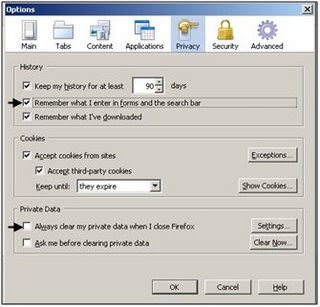
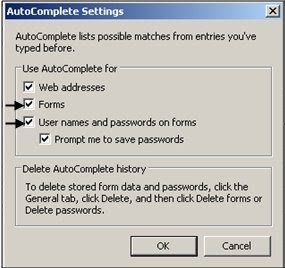
One common question that we are asked is: How can my web browser remember my password information so that I don't have to type it in all the time? Follow the steps below to have Firefox 3 or Internet Explorer 7 remember this data to make life a little easier!

For Firefox 3:
1. Click on Tools, then click Options.

2. Click on the Privacy tab.

3. Make sure that there is a check next to "Remember what I enter in forms and the search bar." Also make sure there is no check next to "Always clear my private data." If this is checked, all saved data (information in forms, passwords) will be erased every time you close Firefox!

For Internet Explorer 7:

1. Click on Tools, then click Internet Options.

2. Click on the Content tab, then click on the Settings box under AutoComplete.

3. Make sure "Forms" and "User names and passwords on forms" is checked.

July 16, 2008

Search from the Address Bar in Firefox 3.0

Keyboard fanatics and Firefox 3.0 lovers alike should enjoy this quick tip about an easy way to search from the address bar using keywords.

To start off, you will need to assign keywords to your search engines. Managing your keywords is done through the "Manage Search Engines" window. To find this window, direct your mouse to the dropdown arrow next to the google sign in the upper right corner of your browser. See picture below.


From here, you should see this screen:
Next, select the search engine to which you would like to assign a keyword and click the "Edit Keyword" button. Assign a keyword for each search engine. For example, I use "goog" for google and "imdb" to search IMDB.

After you're done setting up your keywords, click OK. You are now ready to use your keywords and your address bar as a search engine!

In your address bar, type your keyword and your search terms, and click enter. You will receive search results for your term in whichever search engine's keyword you use. You now have a quick and easy way to see search results from your favorite search engines!