As in the past, I am following the election pretty closely. This year, this means following it on-line.
In general, I find a lot of the election sites uninteresting. But, recently, I found a couple of cool, useful sites.
First, youtube.com and the Public Broadcasting Service (PBS) are collaborating on Video Your Vote. This non-partisan project is asking voters to record your election experiences. The organizers want a grassroots look at this historic event.
Upload a video of your experience with voting -- whether it’s shot at the polls on Election Day, an account of you casting an early vote, or you filming yourself filling out an absentee ballot. Document the energy and excitement, as well as any problems you encounter.
To me, this is a fascinating attempt to create an historic record of the election using Web 2.0 tools. Let us know if you upload to Video to Vote.
After voting irregularities in Florida, and Ohio cast doubts on the winner of the 2000 presidential election and the integrity of the 2004 process, voting rights activists are preparing themselves. There are several sites that are tracking voting problems in order to take action, if necessary, even before Election Day. One of these is Wired.
According to Problems Voting in the General Election?
“Had a problem casting your ballot in this year's general election? We want to hear from you….
Over the next weeks, if you have trouble at the polls, either during early voting or on Election Day, we'd like you to add your issue to our map. Be sure to provide as much detail as possible. You may also include links to video or audio….
Please note that we're not interested in hearing political rants. We're interested in hearing only about problems casting your ballot.”
The article lists specific types of problems that you may encounter.
Be prepared.
Finally, if you haven’t made up your mind for whom you will vote for president, let Glassbooth help you. Glassbooth analyzes your answers to questions about the issues of the day and matches you with one of the presidential candidates.
The process took me about 10 minutes, and gave me this result:

 For more about the election this year, see our earlier posts on factcheck.com and voting in Oakland County, Michigan.
(Thanks to lifehacker.com for the Video Your Vote and GlassBooth links.)
Whenever I'm looking to keep tabs on my favorite people, or want to share with others a short piece of interesting news, I turn to Twitter.Twitter is the definitive "micro-blog" social-networking website. Users can create a simple profile and post short updates (called "tweets") on just about anything -- from their day-to-day activities to political opinions to great links -- whatever they'd like to share with the world. By "short updates" I mean short - each post has a 140 character limit. Quite the challenge for your average sesquipedalian.You can follow more than your friends on Twitter. Check out some of these famous Tweeters:- Barack Obama
- Barack Obama created a Twitter account to keep his fans up-to-date on his latest news. His choice of vice presidential candidate Joe Biden was first released to the public by his Twitter account.
- Kevin Rose
- Creator of the hugely popular social-bookmarking site Digg.
- CNN Breaking News
- Be the first to find out - breaking news updates from CNN
- Stephen Colbert
- Television and movie actor; host of Comedy Central's The Colbert Report
- Jessamyn West
- Of librarian.net and MetaFilter fame - in my mind I think of Jessamyn as "Librarian 2.0" - she's my hero.
A few more fun and useful links:
The Twitter BlogCurious to know what others are talking about on Twitter? The Twitter Blog shows trends in recent tweets.A Newbie's Guide to TwitterTotally confused? This website goes into more detail for new-to-Twitter users.TwitterholicA listing of the top 100 Twitter users.Twittering TeddyIf you're lucky enough to still have a fully functioning Teddy Ruxpin (circa 1985), you might consider using this hacking guide to turn him into a Twitter-reading robot.
Give Twitter a try - and let me know how you like it by commenting here at the Tech Blog or send me a tweet.
Have you ever been stuck on a homework assignment, and wish you had a tutor who could help you understand the material? Now you can, thanks to the Troy Public LibraryThe Library now offers Brainfuse, a live homework help service. Students in 3rd through 12th grades can connect one-on-one to a trained tutor for assistance in math, science, English, and social studies. Tutors are available 7 days a week, from 2 pm-11 pm. Using Brainfuse is easy. First, go here to download and install the Quick Connect software on your home computer.After installation, access Brainfuse by clicking on the "Information On-Demand-All Day, Every Day" link in the middle of the Library's homepage. Click Online Tutoring from the subject list then click Brainfuse. A "virtual" whiteboard will appear, allowing you to chat with your tutor, or to draw diagrams, follow examples, and more.Brainfuse also features a 24-hour writing lab, where you can submit their papers and get feedback about their assignments. Please let us know about your experiences with Brainfuse!
According the the New York Times:"In the Metropolitan Opera’s relentless quest to exploit all media, the company next Wednesday will start making many video and audio broadcasts available for Internet streaming on demand.
Met Player, as the service is called, will be available through the Met’s Web site, metopera.org.... [U]sers will be able to choose from 13 high-definition video performances, 37 standard video recordings and 120 audio broadcasts dating to 1937. The company said it planned to add performances regularly, drawing on its vast historical archives and its continuing high-definition broadcasts....
For $3.99 or $4.99 per streamed opera, users will have a six-hour window in which to listen to or watch a production, once it has started. A monthly subscription for $14.99 brings unlimited streaming, while a yearly subscription costs $149.99."
Last Thursday, I blogged about the state of free wireless in Oakland County, and across the country.
On Friday, the Federal Communications Commission released a report that may, ultimately, open a broad spectrum of airwaves to wireless networks. If so, we might move closer toward a nation-wide, free, wireless network.
Read Wired's analysis of the report and its implications.
And who does Wired blame for the sorry state of U.S. Internet and wireless coverage -- currently 15th in the world? The wireless carriers:
"While FCC Chairman Kevin Martin has expressed interest in offering a free, filtered (porn-free) nationwide broadband network, the wireless carriers aren't quite as enthusiastic about it.
What's their problem? While the U.S.' broadband penetration lags behind fourteen other nations, wireless carriers complain that free WiFi service could interfere with their own networks. What they probably mean, though, is that free WiFi will threaten their existence."
Have you ever had problems with creating charts in Excel 2007, because you didn't know which chart to use? Well, there is a way to simplify this process by using the Chart Advisor plugin by the Office Labs team. What does Chart Advisor do? To quote one of the Program Manager's of the Microsoft Excel team, Scott Ruble: "The Chart Advisor intelligently suggests different chart types based on an analysis of your data in Excel 2007."To install the plug-in, first you must download it here and then run the installer. The next time you boot up Excel you should see the new Chart Advisor icon located in the "Insert" tab. Simply click the icon to run the plug-in.
Since this is a plugin, you have to see it to fully grasp it. Take a look at the video below on how Chart Advisor works. <a href="http://video.msn.com/video.aspx?vid=3092cdf1-75ff-409e-9bdb-b4a818b39952" target="_new" title="Chart Advisor Overview">Video: Chart Advisor Overview</a>
How many of you have sent late night emails that you later regret? To bosses, co-workers, exes?I know I have.Well, if you use Google’s gmail, the company is trying to help you stop this behavior. Google Labs has just developed a new feature for gmail – Mail Goggles – that, when enabled, will ask you a series of math questions before sending your email. The idea is that if you are not in the right state of mind to solve a few math problems, you might want to reconsider sending the email you just wrote.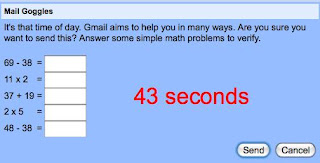 To enable Mail Goggles, in gmail go to Settings then Lab. Then, set when you want Mail Goggles to check your email -- and the difficulty of the math questions -- by going to Settings then General.Now, quit sending those emails that you later regret.


